
AstroSky1.6 - App Store
You'll be able to see results in few seconds.
Publisher Description
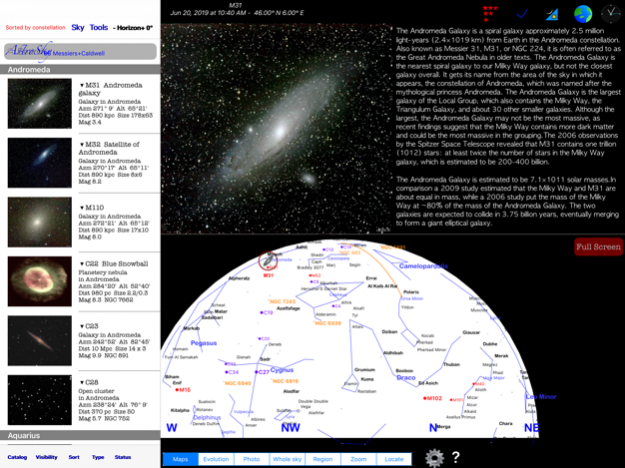
AstroSky is an astronomy application designed to help you observe deep sky objects by giving you a simple and efficient interface to select and locate hundreds of interesting objects including the full Messier, Caldwell as well as double stars catalogs. It is a universal app working on iPads and iPhones.
It allow you to prepare an observation session, keep track of observed objects, sort and filter based on multiple criteria, locate the objects and study their position over the night and the year.
Using the catalog menu, you can choose different combinations of objects to view including stars and constellations, Caldwell,Messier objects or planets.
You can sort the objects by name, by altitude (for best viewing), by magnitude (easiest to see), by constellation, by azimuth (useful in an observatory dome with a slit),
You can filter the view by type (galaxies. nebulas…), by status (Done, Failed, still ToDo) and by visibility (all objects, above the horizon, above a certain altitude).
By choosing Calculate visibility tonight, the app will calculate all the object that will be visible during your observation window.
Once you selected an object, you have a range of possible display modes that provides you more information on each object: An image when available, different sky maps. (whole sky. Half sky, region and zoomed). Evolution maps that show the position in the sky during the night as well as a graph of the altitude during the night. It is usually best to observe when the object is high as long as it is still dark. The yearly chart calculates the highest point reached during the evening (until midnight) for every day over the whole year. It allows you to determine the best time of the year to observe any given object.
The locate option will show you how to point your device to the current position of the object in the sky.
For instance, you can decide to look at open clusters starting by the easiest ones. Select the Visible above the horizon to see what is available right now. Select Sort and choose by magnitude so the brightest and easiest comes first. Now choose Types and select Open Cluster. You are done.
In the sky maps, you can pan and zoom as you desire. With the map options, you can decide to see or not Messiers, Caldwell, stars, star-names, NGCs, the meridian, the ecliptic or constellations on the map. You can decide how many of the objects and stars to see by deciding on the maximum magnitude. This allows you to adapt the map to match your viewing conditions.
A simple to understand sky mode allow you to track your sky and see constellation in front of you,
Ideal to learn the sky.
Jun 20, 2019 Version 1.6
Some internal updates.
About AstroSky
The company that develops AstroSky is Steven Suckow. The latest version released by its developer is 1.6.
To install AstroSky on your iOS device, just click the green Continue To App button above to start the installation process. The app is listed on our website since 2019-06-20 and was downloaded 0 times. We have already checked if the download link is safe, however for your own protection we recommend that you scan the downloaded app with your antivirus. Your antivirus may detect the AstroSky as malware if the download link is broken.
How to install AstroSky on your iOS device:
- Click on the Continue To App button on our website. This will redirect you to the App Store.
- Once the AstroSky is shown in the iTunes listing of your iOS device, you can start its download and installation. Tap on the GET button to the right of the app to start downloading it.
- If you are not logged-in the iOS appstore app, you'll be prompted for your your Apple ID and/or password.
- After AstroSky is downloaded, you'll see an INSTALL button to the right. Tap on it to start the actual installation of the iOS app.
- Once installation is finished you can tap on the OPEN button to start it. Its icon will also be added to your device home screen.
Program Details
System requirements
Download information
Pricing
Version History
version 1.6
posted on 2020-06-20
20. Juni 2019 Version 1.6
Some internal updates.
version 1.6
posted on 2019-06-20
Jun 20, 2019 Version 1.6
Some internal updates.
version 1.6
posted on 2019-06-20
20 Jun 2019 Version 1.6
Some internal updates.
version 1.5
posted on 2014-03-06
version 1.6
posted on 1970-01-01
2019年6月20日 Version 1.6
Some internal updates.
version 1.6
posted on 1970-01-01
20 giu 2019 Version 1.6
Some internal updates.
Disclaimer
Official App Store Link
We do not host AstroSky on our servers. We did not scan it for viruses, adware, spyware or other type of malware. This app is hosted by Apple and passed their terms and conditions to be listed there. We recommend caution when installing it.
The App Store link for AstroSky is provided to you by apps112.com without any warranties, representations or guarantees of any kind, so access it at your own risk.
If you have questions regarding this particular app contact the publisher directly. For questions about the functionalities of apps112.com contact us.
